To add InPost locker delivery to Shopify, you need an integration that connects your shop to InPost and handles the full customer journey – from showing locker availability on product pages to printing labels when you dispatch.
This guide walks through what a complete InPost locker delivery integration with Shopify looks like, how to set it up, and what to watch out for when choosing how to do it.
What is locker delivery and why does it matter for Shopify stores?
Locker delivery lets customers collect their parcels from a self-service parcel locker at a time that suits them: 24 hours a day, 7 days a week.
In the UK, InPost is the leading locker delivery network, operating thousands of lockers at supermarkets, petrol stations, gyms, and high streets nationwide.
For Shopify stores, offering locker delivery alongside standard home delivery has several benefits:
- Higher conversion rates: customers who can see their preferred delivery option available are more likely to complete their purchase
- Fewer missed deliveries: lockers eliminate failed home delivery attempts, reducing redelivery costs and customer service queries
- Lower cost per shipment: Locker delivery is typically more cost-effective than home delivery
- Broader customer appeal: customers who aren't home during the day, or who live in flats with unreliable delivery access, strongly prefer locker options
Why offer InPost locker delivery on your Shopify store?
InPost is the UK's largest parcel locker network, with thousands of lockers in locations customers visit every day – supermarkets, petrol stations, gyms, and high streets. For Shopify brands, adding InPost alongside home delivery gives customers a genuine choice at checkout rather than a single option.
Locker delivery also tends to be more cost-effective than home delivery for eligible parcels, and eliminates the failed delivery problem entirely. Customers collect when it suits them, 24 hours a day. For brands shipping to urban areas or customers who aren't reliably home during the day, it's increasingly an expectation rather than a nice-to-have.
What does an InPost Shopify integration need to do?
A complete InPost integration covers several distinct touchpoints across the customer and fulfilment journey. Here's what it needs to handle:
1. Product page visibility
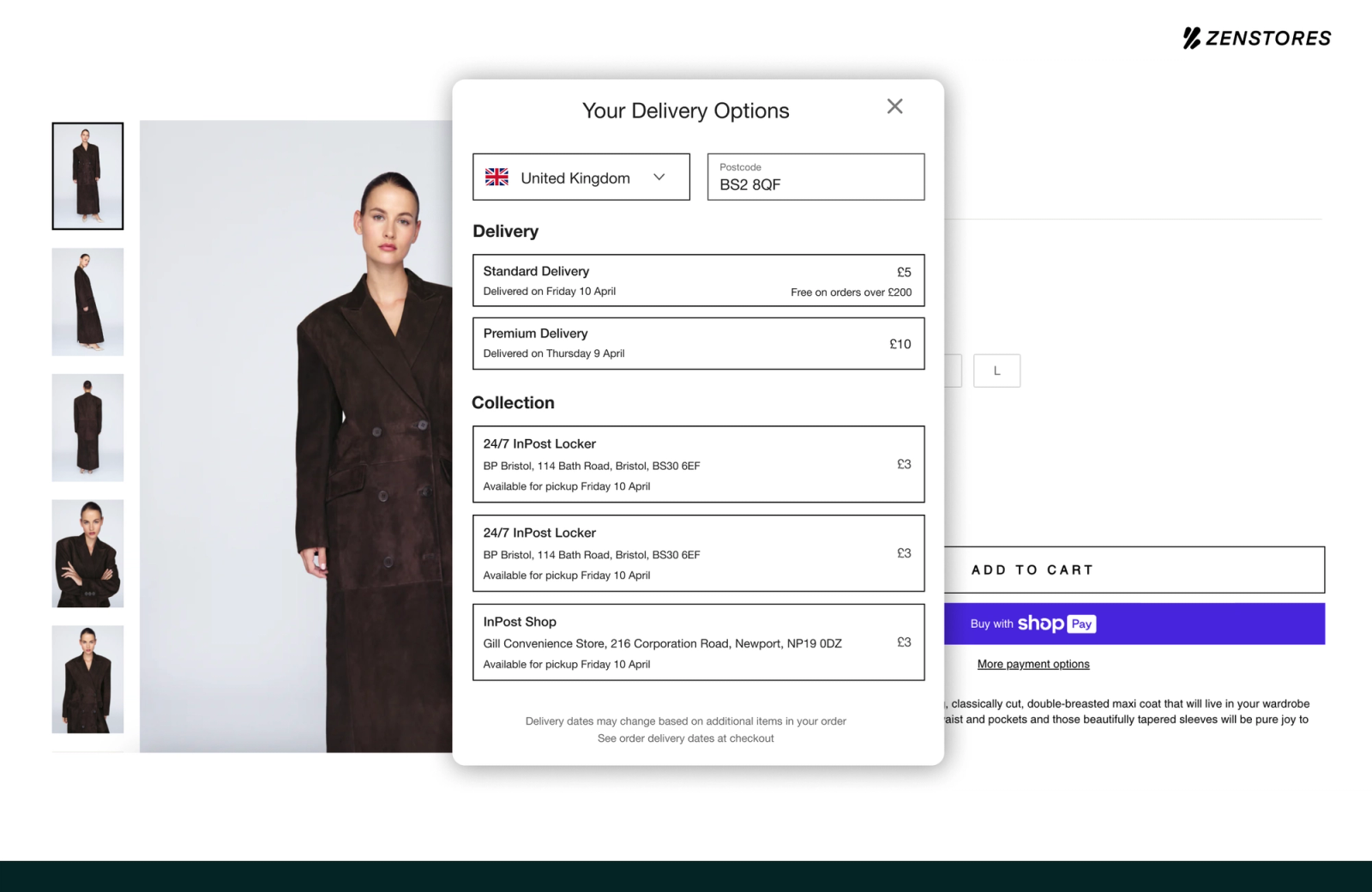
Customers should be able to see whether InPost locker delivery is available and when their order will arrive before they add to cart.
2. Parcel size checking
InPost lockers come in different sizes. If your product is too large for any available locker, InPost shouldn't be shown as an option. Without automatic size checking, you risk offering locker delivery for orders that can't actually be fulfilled that way.
3. Reliable data sync
When a customer selects locker delivery, the locker details need to flow through correctly to your fulfilment system. Poor data sync creates manual steps, errors, and delays.
4. Label printing
You need to be able to generate compliant InPost shipping labels without switching between systems.
How to add locker delivery to Shopify with Zenstores
Zenstores is the first complete InPost integration for Shopify in the UK, covering the full journey from product page to locker.
Our team works with you to get everything configured, most Shopify brands are live with InPost locker delivery within days. Here's what the setup covers:
Step 1: Add the InPost product page widget
Zenstores Convert adds a branded InPost availability widget to your Shopify product pages. Customers can see whether locker delivery is available and when their order will arrive – before they add to cart.
Step 2: Enable InPost at Shopify checkout
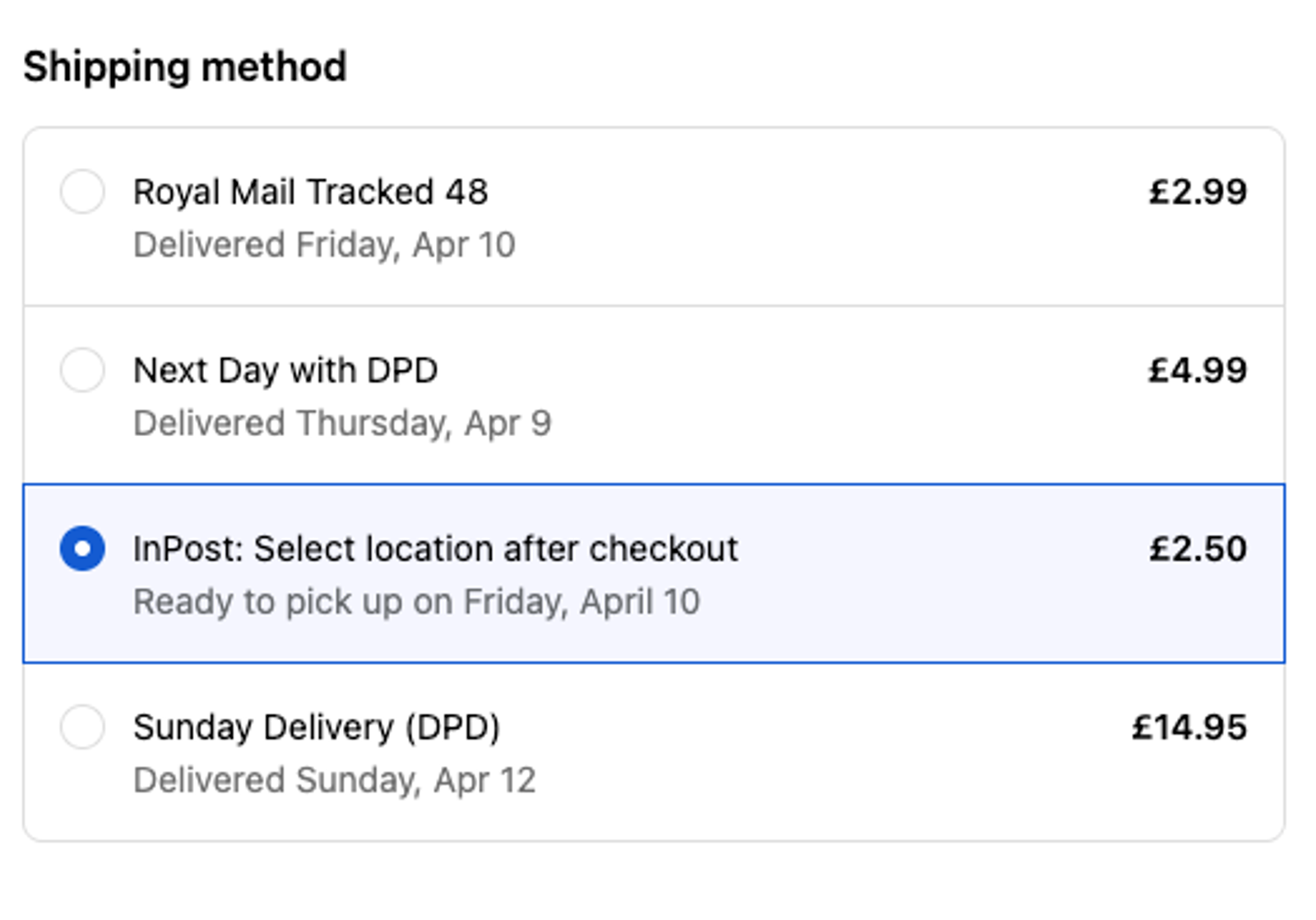
Zenstores shows InPost locker delivery as an option at your Shopify checkout alongside your other delivery options. Smart Locker Check automatically verifies that your product dimensions fit an InPost locker, so InPost only appears when the order will actually fit.
Step 3: Dispatch orders from Zenstores
When a customer selects InPost, all order and locker details sync automatically into Zenstores. Your team picks, packs, and prints InPost labels in bulk alongside your other carrier labels.
What to look for when adding InPost to Shopify
Not all InPost integrations for Shopify are built the same. Some cover label printing and stop there. Others handle checkout but leave product pages untouched. A few promise full coverage but struggle with data sync in practice.
Here's what to look for and why each point matters:
Does the integration show InPost on product pages? Checkout-only integrations miss the conversion opportunity at the point of product discovery.
Does it show estimated delivery dates before checkout? Delivery date visibility at product page level measurably improves conversion.
Does it automatically check whether orders fit in a locker? Without this, you risk offering InPost for orders that can't actually be fulfilled that way.
How reliable is the data sync? Poor sync creates manual steps and dispatch errors.
Can you print InPost labels alongside other carrier labels? Processing InPost orders separately from the rest of your shipments adds unnecessary friction.
Zenstores covers all of these and as the first complete InPost integration for Shopify in the UK, it's the only platform built specifically around how UK brands ship.
Ready to add locker delivery to your Shopify store?
Zenstores handles the full InPost journey – from product page widget to bulk label printing – so your team doesn't have to piece it together from multiple tools.
Zenstores is a shipping operations platform for UK ecommerce brands. Connect Shopify, WooCommerce, and Magento with Royal Mail, DPD, Evri, InPost, and all major UK carriers.
Ready to get started? Start your free trial.
Frequently Asked Questions
Can I add InPost locker delivery to my Shopify store?
Yes. Zenstores is the first complete InPost integration for Shopify in the UK, covering product page availability, automatic parcel size checking, data sync, and bulk label printing.
How do I show InPost as a delivery option on my Shopify product pages?
Zenstores Convert adds a branded widget to your product pages showing locker availability and estimated delivery dates before a customer adds to cart.
Can customers see an estimated InPost delivery date before they check out?
Yes. Zenstores displays estimated InPost delivery dates on product pages, giving customers confidence in their delivery choice before they reach checkout.
Can I print InPost labels at the same time as my other carrier labels?
Yes. Zenstores generates compliant InPost labels in bulk alongside Royal Mail, DPD, Evri, and any other carrier you use.
Does this work with WooCommerce and Magento too, or just Shopify?
Zenstores supports InPost for Shopify, WooCommerce, and Magento.
How many InPost lockers are there in the UK?
InPost operates thousands of parcel lockers across the UK and the network is continuing to expand.
Is Zenstores better than ShipStation for InPost locker delivery on Shopify?
ShipStation supports InPost for label printing only. Zenstores is the first complete InPost integration for Shopify in the UK, covering the full journey from product page to locker.
How do I get started with InPost on Shopify?
Book a demo and our team will walk through your store and fulfilment setup. Most Shopify brands are live with InPost within days.
