A WMS (warehouse management system) is software that runs the day-to-day work inside a warehouse, from the moment stock arrives to the moment orders leave. It tells your team where to put goods away, tracks what you hold and where, guides picking and packing, and hands finished orders over to the carrier.
Large distributors, third-party logistics providers and manufacturers use warehouse management systems to keep track of high volumes of stock and orders across big sites. Ecommerce brands usually start considering one when their order volumes grow faster than their team can keep up with.
What does a WMS do?
A WMS follows stock through six stages, and a full system covers all of them. The first three stages keep track of the stock you hold. The last three turn orders into parcels on their way to customers.
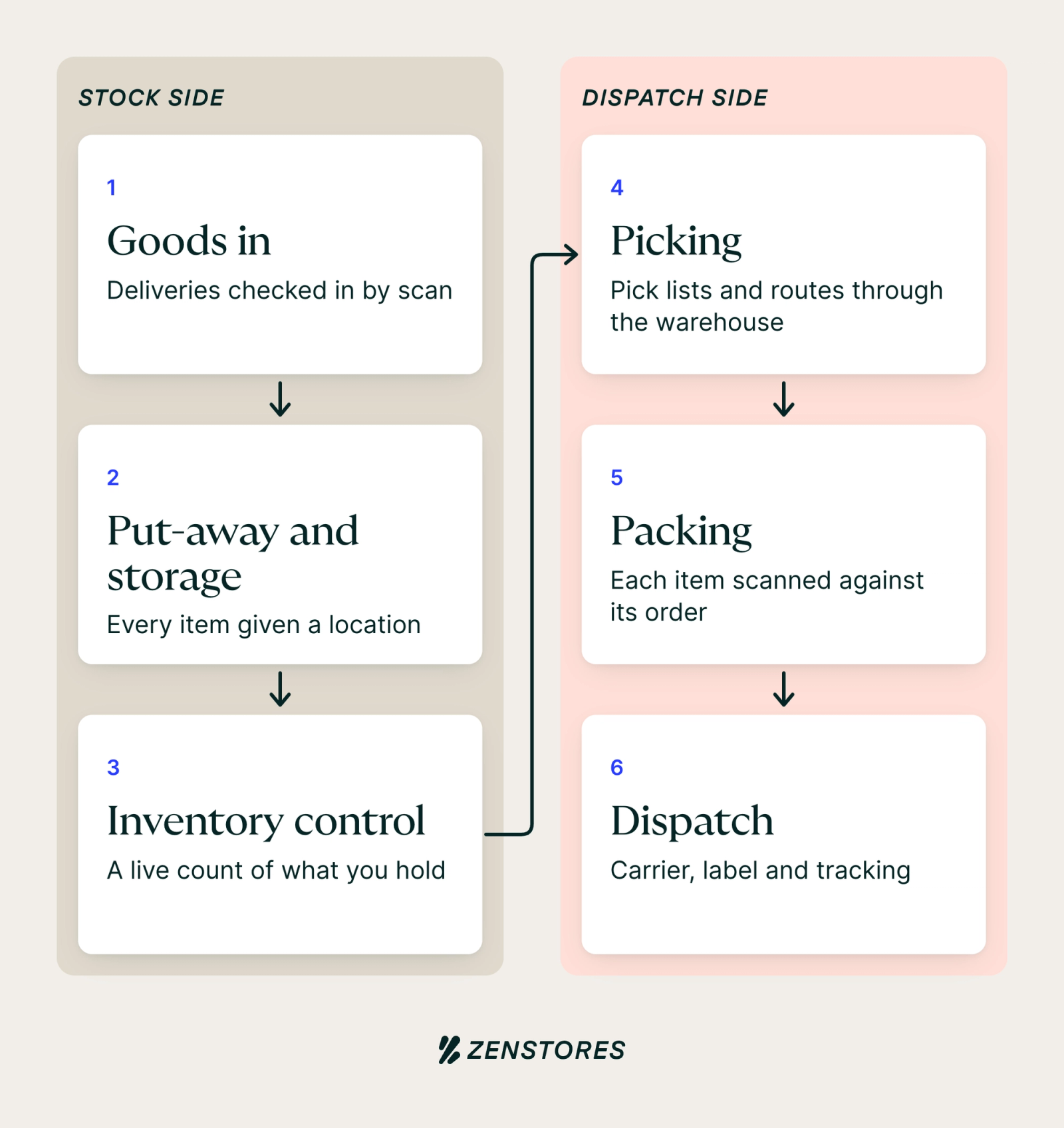
- Goods in. Deliveries are scanned and checked against what was ordered, so shortages and damage are caught early.
- Put-away and storage. Every item is given a location, so anyone on the team can find it.
- Inventory control. A live count of what you hold and where, shared with your other systems.
- Picking. Orders become pick lists, often grouped into batches, with a route through the warehouse.
- Packing. Each item is scanned against the order before the box is sealed, and the paperwork prints.
- Dispatch. The order gets a carrier and service, a booked shipment, a label and tracking.
What are the types of WMS?
Warehouse management software ranges from systems built for large distribution networks to lighter tools for smaller teams. The right type usually depends on the size and nature of the business, according to TechTarget.
- Standalone. Software built only for warehouse management, like Manhattan Active Warehouse Management. It’s bought separately and connects to your other systems through integrations.
- Cloud-based. Hosted by the vendor and paid for by subscription, with a lower upfront cost and a quicker rollout. Mintsoft, Descartes Peoplevox and Helm WMS all work this way, aimed at 3PLs, retailers and multichannel brands.
- ERP-integrated. A warehouse module inside a wider ERP, sharing data with finance, purchasing and sales. NetSuite WMS works this way, as an add-on to NetSuite’s ERP.
- On-premise. Installed on your own servers and maintained by your own IT team, with more control and a higher upfront cost. Enterprise systems like SAP Extended Warehouse Management can be run this way.
- Dispatch-focused. Software like Zenstores covers picking, packing and shipping without the stock side. They suit ecommerce brands whose stock control already sits in their sales channel or an inventory tool.
The largest operators often build their own. Amazon, for example, has an in-house team called Amazon Fulfillment Technologies that builds and maintains its warehouse management systems.
WMS vs ERP, inventory software and shipping software
A WMS manages how stock physically moves through a warehouse. Three other types of software overlap with it in places, which is why they're easy to mix up.
| System | What it manages | Where it overlaps with a WMS |
|---|---|---|
| WMS | Stock moving through a warehouse: goods in, storage, picking, packing, dispatch | |
| ERP | The whole business: finance, purchasing, sales, HR, and stock at a high level | Stock records. Many ERPs sell a WMS as an add-on module |
| Inventory management software | What you hold across channels and locations, reorder points, purchasing | Stock levels, without directing the work on the warehouse floor |
| Shipping software | Getting orders to the carrier: importing orders from sales channels, choosing the carrier and service, printing labels, and sending tracking | Dispatch, the last stage of a WMS. Some tools, such as Zenstores, also cover picking and packing |
Dispatch-focused WMS: built for growing ecommerce brands
Full WMS platforms are built for large warehouses, with dedicated IT teams and months to spend on rollout. Growing ecommerce brands tend to look different: stock levels already managed in Shopify, Amazon or an inventory tool, a small team in one unit, and more orders every month. For them, the pressure sits in picking, packing and getting parcels out on time.
That’s where dispatch-focused systems come in, covering that half of a WMS on its own. Zenstores batches orders from every sales channel with a pick route and checks each item with scan-to-pack. Automations then set the service, book the shipment and print the label. Most teams are set up within about three days, where a full WMS typically takes six months or more.
See how pick, pack and dispatch works in Zenstores, or read our guide to choosing a warehouse management system if you’re weighing up both.
Frequently Asked Questions
What does WMS stand for?
WMS stands for warehouse management system: software that runs the work inside a warehouse, from receiving stock to dispatching orders.
What are the main features of a WMS?
Most systems include receiving, put-away, inventory management, picking, packing and shipping, usually built around barcode scanning. Larger systems add labour management, yard management and links to warehouse automation equipment.
Is a WMS the same as an ERP?
No. A WMS runs the warehouse itself. An ERP is software that brings a business’s core processes together in one system, such as finance, HR, supply chain and inventory. The two usually share data, and the WMS updates the ERP’s stock figures as goods move.
What’s the difference between a WMS and inventory management software?
Inventory management software tracks what you hold across your channels and locations, and when to reorder. A WMS also directs the work inside the warehouse: where stock goes, how it’s picked, and how orders are packed and dispatched.
How much does a WMS cost?
It depends on the size of the system. For a growing ecommerce brand shipping around 5,000 orders a month, most cloud WMS cost roughly $10,000 to $21,000 in the first year before any paid implementation, according to a six-system comparison by WMS provider SKUSavvy. If your pressure sits in dispatch, Zenstores covers that for much less, the Zenstores plan costs £1,908 a year on an annual plan, plus a small fee per shipment.
How long does it take to implement a WMS?
A typical WMS implementation takes around six to eight months, depending on the vendor and the resources you have, according to MHI. Dispatch-focused tools such as Zenstores are usually set up within days.
What hardware do you need for a WMS?
Most systems run on barcode scanners or mobile devices, label printers and, for dispatch, connected scales. Our hardware guide covers what works with Zenstores.
Do small ecommerce brands need a WMS?
Often not a full one. Most small brands feel the pressure in dispatch first, which means picking, packing and carrier selection, and those can be handled without a full WMS. Our guide to choosing a warehouse management system covers how to decide.
Is Zenstores a WMS?
Zenstores covers the dispatch half of a WMS: batch picking, pick routes, scan-to-pack, paperwork and automated carrier booking. It doesn’t manage stock, so brands that need stock control run it alongside an inventory tool such as Unleashed, or a full WMS.
